


Titolare del sito: Luca Fanti
Partita IVA: IT04284701200
Indirizzo: Via Stazione 57
40037 - Sasso Marconi (BO) IT
Email: buildify@buildify.it
Attività svolta in regime forfettario
Tools, Guides and Consulting for
Home Automation and Electrical Installations
© Buildify – All rights reserved · Technical cookies are used for the proper functioning of the site · Privacy Policy · Cookie Policy · Legal Notice
Buildify.it per Tecnici di Home & Building Automation
Buildify.it è una piattaforma operativa dedicata ai tecnici di Home & Building Automation.
Offre tool tecnici e contenuti pratici a supporto di progettazione, configurazione e gestione di sistemi integrati per edifici.
Sono disponibili risorse per:
strutturare soluzioni di automazione funzionali e scalabili
supportare attività di configurazione, verifica e documentazione
migliorare metodo di lavoro, coordinamento e qualità dell’impianto
Contenuti operativi pensati per professionisti che lavorano su sistemi evoluti e integrati.
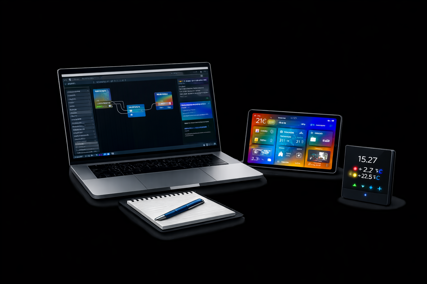
IL CUORE TECNOLOGICO DI BUILDIFY : LTS (Logical Tagging System)
Ideato e sviluppato da BuildifyLab
Il Logical Tagging System (LTS) è il workflow esclusivo progettato
per trasformare radicalmente la preparazione dei progetti KNX.
Abbiamo progettato un sistema che anticipa la programmazione ETS,
eliminando le attività ripetitive e azzerando il margine di errore.
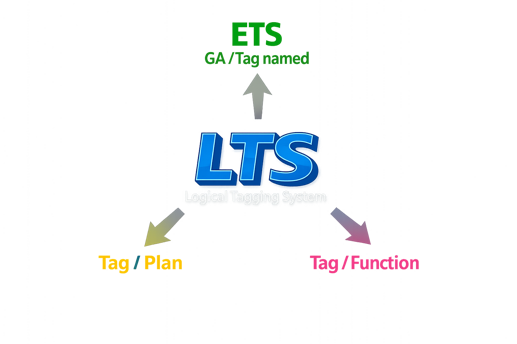
Come funziona il Metodo LTS
Il sistema si basa sull’identificazione univoca delle funzioni tramite Smart Tagging. Ogni Tag non è solo un’etichetta, ma un contenitore logico che include già i Datapoints (DP) di riferimento per ogni specifica funzione di sistema.
I pilastri del sistema:
- Documentazione istantanea: Genera una documentazione tecnica di progetto precisa in una frazione del tempo abituale.
- Mapping intelligente: Collega in modo fluido le funzioni ai dispositivi fisici, mantenendo la massima coerenza tra lo schema e l’installazione reale.
- Import massivo in ETS (Il Game Changer): Esporta e importa centinaia di Group Addresses (GA) in ETS, già perfettamente nominati e strutturati. Ogni GA include automaticamente i dettagli di: Funzione, Edificio, Stanza, Dispositivo e Canale associato.
"LTS non è solo uno strumento; è il nuovo standard operativo per gli integratori KNX che vogliono scalare la produttività."
Digital tools
LTS Suite (Logical Tagging System) è una piattaforma software professionale progettata per supportare progettisti, system integrator e installatori nella gestione strutturata dei sistemi di automazione, con particolare focus sugli ambienti KNX.
Alla base della suite vi è il metodo LTS, che introduce una logica gerarchica (Main, Middle, Sub) per organizzare in modo coerente e scalabile tutti i dati di progetto. Questo approccio consente di ridurre gli errori, migliorare la leggibilità e velocizzare le fasi di sviluppo.
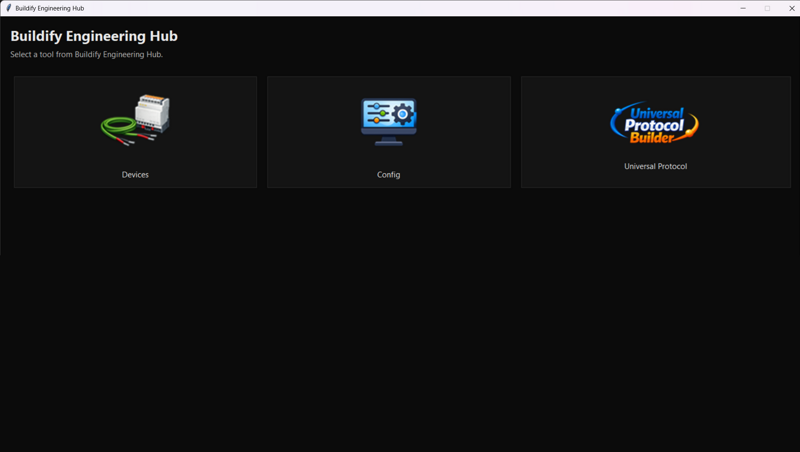
La suite è composta da due moduli principali: Device Tool, Config Tool e Universal Protocol Builder
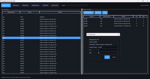
Il Device Tool permette la gestione dei dispositivi e delle variabili di campo (Modbus, IoT e protocolli generici), garantendo una base dati ordinata e pronta per l’integrazione.
Il Config Tool rappresenta il cuore del sistema e include diverse sezioni operative:
la Logic Board, per la definizione della logica funzionale;
il Tag Plan, per la gestione strutturata dei TAG secondo il metodo LTS;
la sezione DIN, per l’organizzazione hardware;
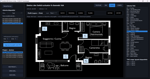
e la sezione Plan, per la suddivisione del progetto in ambienti e funzioni.
Universal Protocol Builder è il modulo dedicato alla trasformazione dei protocolli di comunicazione (Modbus, IoT e altri) in strutture di Group Address (GA) compatibili con ETS.
Consente una mappatura automatica e coerente dei dati, semplificando l’integrazione tra sistemi e riducendo errori manuali.
Uno degli elementi chiave della LTS Suite è l’esportazione automatica di file CSV compatibili con ETS, che consente di generare indirizzi di gruppo coerenti e pronti per l’importazione, eliminando attività manuali e riducendo drasticamente gli errori.
LTS Suite rappresenta quindi un sistema completo che trasforma la progettazione da un processo manuale e frammentato a un flusso strutturato, efficiente e altamente professionale.
Standard equipment
SYS - System
LGT- Lighting No. 1 to 300
SHD Shading No. 1 to 100
HTG Heating No. 1 to 100
AC Cooling No. 1 to 75
FC Fan Coil No. 1 to 60
VMC Ventilation No. 1 to 12
PMP Pump No. 1 to 18
FAN Fan No. 1 to 18
EXT Extractor No. 1 to 18
EAT Heater No. 1 to 18
GOU Gen Out No. 1 to 18
MOT Motor No. 1 to 18
SEN Presence Sensor No. 1 to 64
RGB RGBW No. 1 to 30
GEN Generic Variables No. 1 to 255
LOG Logic Operations No. 1 to 25
SCN Scene No. 1 to 115
SCE Scene ETS No. 1 to 255
ALM Intrusion Alarm System
SST Alarm System No. 1
SIN Alarm Input No. 1 to 180
SOU Alarm Output No. 1 to 101
ALF Fire/Smoke Alarm No. 1 to 63
ALT Technical Alarms No. 1 to 63
ENE Electricity Meter No. 1 to 30
HOT Hot Water No. 1 to 28
CLD Cold Water No. 1 to 28
GAS Gas Meter No. 1 to 16
NRG Energy Systems No. 1 to 18
ENV Environmental Sensors No. 1 to 12
MAP Preventive Maintenance No. 1 to 18
MAC Corrective Maintenance No. 1 to 40
AUD Audio No. 1 to 20
VID Video No. 1 to 8
LTS Suite 18
TLS Suite lts logical tagging system
In Stock
Suite Key Features:
- 📂 Smart Device Management: Select devices from price lists or templates, assign the number of channels, and define DIN rail module width. Copy the manufacturer’s part number directly for an instant search within the ETS catalog.
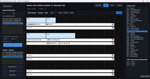
- 🧠 Logic Board : Design functional associations with an intuitive block diagram interface. This visual tool allows you to map logic and connections between functions and devices before you even begin programming.
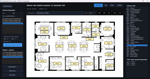
- 📍 Tag Plan (Drag & Drop): Drag tags directly onto the project floor plan. Building and Room assignments are automatically recorded and will appear in the Group Address (GA) description within ETS.
- 🔳 DIN Grid & PA Mapping: Align devices on a technical grid (DIN Page) or import them into the floor plan, assigning Physical Addresses (PA) with a simple drag-and-drop.
- 🔄 Multi-Protocol Bridge: Create or import variables from various protocols and generate an ETS-ready file with hundreds of named GAs in just seconds.
LTS Suite is a digital technical support tool designed to facilitate and structure the creation of KNX group addresses within the ETS environment, supporting design and configuration activities.
The tool enables the generation of group address structures based on project floor plans and user-defined functional TAGs, without any prescriptive or binding value.
Scope of useThe product is intended exclusively for KNX professionals (installers, designers, system integrators, energy managers) holding a VAT number.
The tool:
does not replace ETS;
is not certified design software;
does not guarantee the correctness of generated addresses;
does not replace the technical, regulatory, and functional verification of the KNX project.
Final responsibility for the project always remains with the professional.
KNX NoteBuildify Engineering Hub is an independent tool.
It is not affiliated with, approved by, or certified by the KNX Association.
KNX, KNX Association, ETS and related trademarks are the property of their respective owners.
General operationImport of the project floor plan
Placement of functional TAGs in rooms
Automated function association according to predefined rules
Generation of a file compatible with ETS import
The tool does not interact with ETS system files and does not modify existing configurations.
Main featuresTAG placement on floor plans
Multi-layer management for multiple floor plans
Structured generation of group addresses
ETS-compatible export
Internal reference structure for group organization
Portable software (EXE)
No installation required
Available versionsDEMO
PRO
Demo versionThe Demo version is provided for evaluation purposes only, with functional or quantitative limitations.
Using the Demo allows users to verify:
the operational workflow;
compatibility with their working method;
suitability of the tool for their needs.
License and right of useUpon purchase, a non-exclusive, personal, and non-transferable right of use is granted to the person or company indicated on the invoice, with no time limits.
Resale, redistribution, or granting the product to third parties is not permitted.
The software is provided “as is”, without express or implied warranties.
License Activation
This PRO version of LTS Suite is licensed for use on a single workstation.
The software may use system-specific parameters to validate the execution environment.
Use of the software on multiple systems requires additional licenses.
Support and updates
Unless otherwise expressly stated:
project technical support is not included;
future free updates are not guaranteed;
reported issues do not constitute an obligation to intervene.
Fiscal and administrative aspectsService provided under the Italian flat-rate tax regime pursuant to Art. 1, paragraphs 54–89, Law 190/2014.
VAT not applied according to current regulations.
€2.00 stamp duty included in the price.
Microsoft Windows 10 / 11
For professionals. Read before buying.
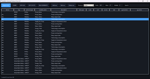
Stiamo lavorando a nuovi tool e contenuti operativi dedicati ai professionisti KNX e all’automazione degli edifici.
Iscriviti alla newsletter in home page per non perdere aggiornamenti, strumenti e approfondimenti tecnici.